管理員端顧客卡券管理:搜尋/篩選卡券清單+詳情 Drawer+強制刪除撤銷(必填異動原因)
prospec 流程進度
跨 repo 進度
manage-customer-vouchers
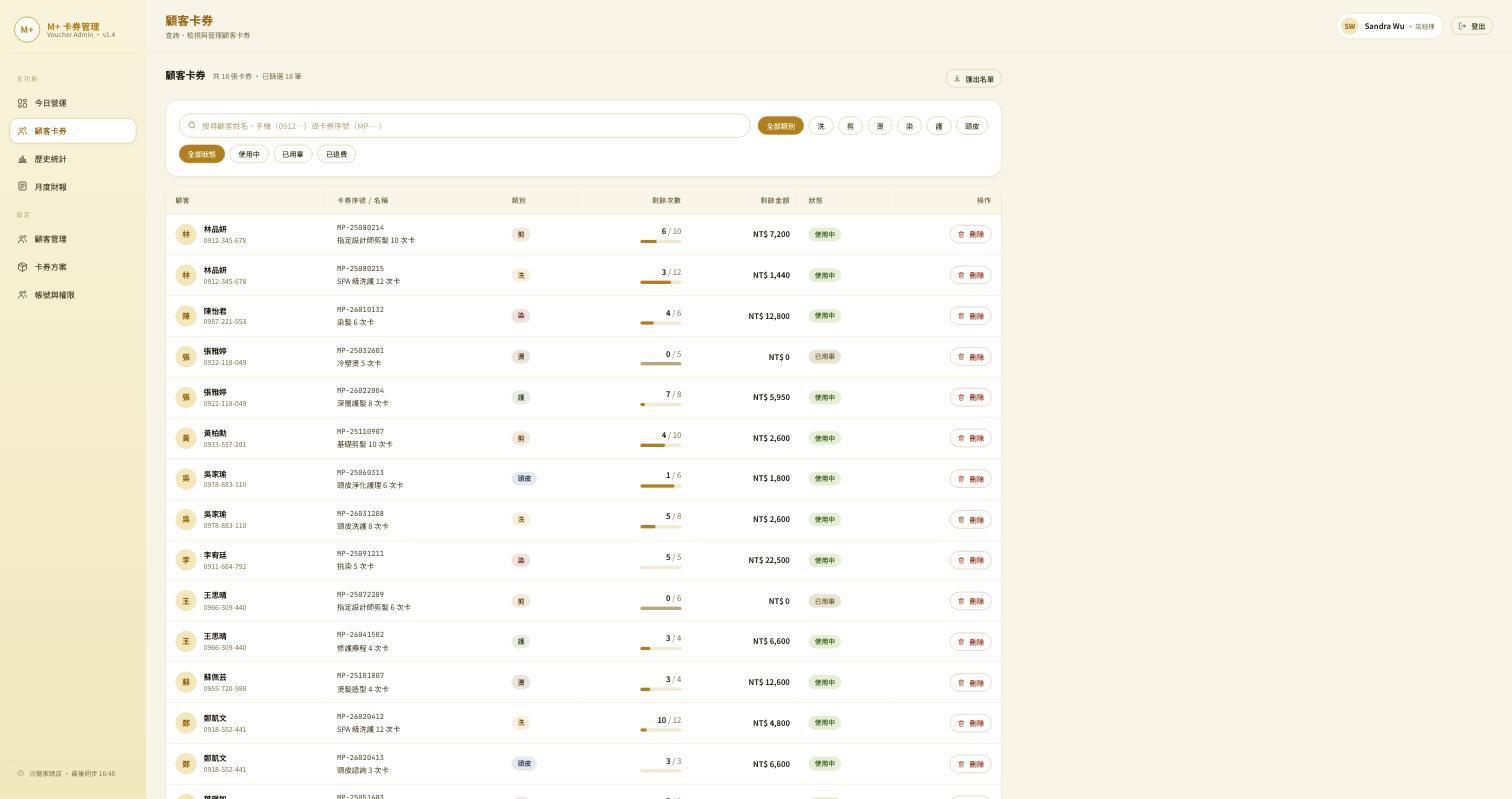
Epic 1:顧客卡券管理 (Customer Voucher Management) — 對應頁面:顧客卡券 設計稿依據:「M+ Admin.html」(2026-08-06) 顧客卡券頁,2026-08-10 依團隊提供的完整 User Story 文件(含詳情面板、上方數字、異動紀錄的網路位置欄位)第二次改版,取代 08-09 的推測版本。
Background
顧客打來問卡券還剩幾次、要退費、或是開錯卡要取消,管理員現在沒有一個地方可以查、也沒辦法自己刪,只能請工程幫忙,而且刪掉之後沒有留下誰刪的、為什麼刪。
本變更新增「顧客卡券」管理頁面,讓管理員自己查得到、也刪得掉,並且每次刪除都留下紀錄。對應 10/3 第一階段上線需求「報表系統 › 顧客卡券(可刪除)」。
User Stories
Edge Cases
- 已失效/已用完的卡券:還是查得到,清單與詳情面板都會顯示,並標示狀態
- 重複刪除:已經作廢的卡券再點一次刪除,系統要擋下來並說明原因
- 空白搜尋:什麼都沒輸入時顯示全部(分頁呈現),不能報錯
- 同名顧客:有多位顧客同名時,清單要能用手機或頭像分辨出來
- 序號與手機的輸入格式:不管有沒有加 MP- 前綴、手機有沒有打分隔線,都要搜得到
Functional Requirements
- FR-001: 提供卡券搜尋,支援顧客姓名、手機(含/不含
-)、卡券序號(MP-…)三種查詢條件 - FR-002: 提供「六大類別」與「狀態」兩組篩選標籤,可以同時選。狀態值為使用中/已用畢/已退費三種(2026-08-23 依設計稿確定)
- FR-003: 卡券清單顯示顧客頭像/姓名/手機、卡券序號、名稱、類別、剩餘次數(含進度條)、剩餘金額、狀態;標題列顯示「共 N 張卡券 · 已篩選 M 筆」的文字計數(2026-08-24 依設計稿修訂,原為 KPI 卡)
- FR-004: 點卡券任一列會開啟詳情面板,內容有剩餘次數/金額、購買金額、單次價值、開卡日期、開卡人員、使用進度、可用狀態、完整異動時間軸
- FR-004a(2026-08-23 決議): 「使用進度」對門市開的卡與匯入的卡一律顯示進度條,分母是「這張卡開出/匯入進來時共有幾次」;匯入前的使用歷程不算在內,畫面需說明這一點
- FR-005: 清單上和詳情面板裡都要有刪除/撤銷的入口
- FR-006: 刪除是「作廢」而不是真的清掉——顧客端與管理端都看不到,但資料留在系統裡可追查
- FR-007: 刪除前要跳確認視窗,而且一定要選原因(顧客退費/輸入錯誤撤銷/店家補償重發/其他)
- FR-007a: 原因選「其他」時要出現文字欄位讓管理員補充(是否必填、字數上限見 Open Questions)
- FR-007b: 刪除/撤銷是管理員在後台頁面上就能完成的操作,不需要工程協助;權限僅限管理員
- FR-008: 每次刪除都要留下可追查的紀錄(誰刪的、時間、原因、從哪個網路位置),並顯示在該卡券的詳情面板時間軸上
- FR-009: 實際的退費金流不在這次範圍內
- FR-010(2026-08-23 依設計稿補): 提供「匯出名單」,匯出目前篩選結果的卡券清單
Success Criteria
- SC-001: 用姓名、手機、序號三種方式都查得到正確的卡券清單,篩選標籤可以疊加使用,標題列計數隨篩選同步更新
- SC-002: 刪掉的卡券 100% 不再出現在顧客那邊,也 100% 留在系統裡查得到(含時間軸事件)
- SC-003: 每一次刪除都產生含誰刪的/時間/原因/網路位置的紀錄,完整率 100%
Related Modules
- (owl 為產品層 spec hub,無程式模組)
- 後端:已具備作廢卡券的能力,但目前不會記錄「為什麼刪」與「誰在哪裡刪的」,需要補上
- 前端:管理後台目前沒有這個頁面,要新做(含右側滑出的詳情面板)
- 技術細節(資料表、欄位、既有功能的差異)見同目錄
implementation-notes.md
Open Questions
2026-08-22 由 Jacky 逐題答覆(Ci 轉述)。決議彙整見
docs/grooming/2026-08-22-admin-console-open-questions-resolved.md。
-
跨規格衝突:本 US-2 定義為「管理後台 UI 操作」,— 2026-08-22 決議:以本 change 為準,管理員於管理頁面可刪除卡券。所有管理員皆可操作(specs/002-voucher-ui-enhancement定義為「API only、僅 ADMIN」manage-account-permissions已確立無管理員內部分層)- ⚠️ 待辦:舊版規格(002)還寫著「只能透過程式介面操作」,需同步改掉。細節見
implementation-notes.md
- ⚠️ 待辦:舊版規格(002)還寫著「只能透過程式介面操作」,需同步改掉。細節見
-
異動原因「其他」是否需要開放文字說明欄位— 2026-08-22 決議:需要(見 FR-007a) - NEEDS CLARIFICATION(2026-08-22 細化): 「其他」的文字說明欄位是否必填?字數上限?
-
詳情面板「使用進度」的計算基礎(次數型 vs 金額型呈現是否不同)— 2026-08-23 決議:兩種卡券都顯示進度條,分母為「綁定/開卡當下的總次數」(即綁定後進度,非終身進度)- 已查證現有系統做得到,不需要改資料庫
- 已知限制(需在畫面上說明):舊系統在匯入之前已經用掉的次數查不到,所以進度的分母是「匯入進來時還剩幾次」。例:原本 10 次、匯入前已用 3 次、只匯入剩下的 7 次 → 畫面顯示「0/7」而非「3/10」
- 技術依據見
implementation-notes.md
-
贈品與產品的業務差異— 已由卡券方案維護(Epic 4)文件釐清,與本變更無關 - 5 月產出的設計規格是照舊版畫面寫的,要對齊這次的詳情面板與時間軸重做
Constitution Check
- Reviewed against
prospec/CONSTITUTION.md(2026-05-24 版) - P1(owl 是產品層):PASS — 僅描述意圖與行為,詳情面板/時間軸為行為描述非技術實作
- P2(契約意圖在 owl、實體在 cockatiel):PASS — 未指定 endpoint/schema;void/revoke 實體以 cockatiel openapi.yaml 為權威
- P3/P4(兩軌分離、協調點):PASS — 無新增手動同步步驟
UI Scope
Scope: full
(設計稿已存在:M+ Admin 顧客卡券頁,要重新萃取才會包含詳情面板的互動細節。)
Design Spec: Manage Customer Vouchers
Generated from: proposal.md (ui_scope: full) Platform: figma Last updated: 2026-05-17
Overview
An admin (management-side) page that lets branch administrators search a customer's vouchers and lets high-privilege roles revoke (void) a voucher with a confirmation step. Covers proposal stories US-1 (search) and US-2 (revoke).
This design reuses the existing M+ hair-salon design system — the shared "Design Tokens" variable collection (warm gold/cream identity) already used by the M+ Customer and Designer portals — so the admin surface is visually consistent with the rest of the product.
Visual Identity
Color Palette
| Token | Value | Usage |
|---|---|---|
| --color-primary | #ca8a04 | Primary actions, active states, links |
| --color-primary-hover | #a16207 | Primary hover |
| --color-primary-muted | #ca8a0415 | Subtle tinted backgrounds, pills |
| --color-primary-border | #ca8a0433 | Card / input borders |
| --color-surface | #ffffffe6 | Card backgrounds |
| --color-surface-solid | #ffffff | Inputs, table surface |
| --color-surface-muted | #fafaf9 | Table header / zebra rows |
| --color-background | #f5f5f4 | Page background |
| --color-text | #0c0a09 | Primary text |
| --color-text-secondary | #44403c | Secondary text |
| --color-text-muted | #78716c | Labels, captions |
| --color-text-disabled | #a8a29e | Disabled / revoked rows |
| --color-border | #e7e5e4 | Table dividers |
| --color-success | #16a34a / bg #dcfce7 | Status: 有效 (active) |
| --color-error | #dc2626 / bg #fee2e2 | Destructive action, status: 已撤銷 |
| --color-disabled-bg | #f3f4f6 | Status: 已失效 / 已用完 |
Typography
Family: Noto Sans TC (CJK-capable). Latin/numeric also rendered with Noto Sans TC.
| Token | Size | Weight | Usage |
|---|---|---|---|
| --font-heading-lg | 28px | 700 | Page title |
| --font-heading | 20px | 700 | Card / dialog titles |
| --font-title | 16px | 500 | Table column headers, row primary text |
| --font-body | 14px | 400 | Table cell text, buttons |
| --font-small | 13px | 400 | Secondary cell text |
| --font-caption | 12px | 400 | Captions, helper text |
Spacing Scale
| Token | Value | Usage |
|---|---|---|
| --space-xs | 4px | Inline gaps |
| --space-sm | 8px | Compact padding, pill padding |
| --space-md | 16px | Default padding, cell padding |
| --space-lg | 24px | Card padding, section spacing |
Visual Style
- Border radius:
22px(cards/dialog),12px(inputs/buttons-rect),999px(pill badges) - Shadow:
0 25px 50px #ca8a042e(card),0 16px 40px #00000026(dialog) - Transition:
150ms ease-in-out - Page background: warm radial gradient (
#fff8e1 → #fafaf9 → #f8f5f0)
Components
TopBar
Layout: flex, horizontal, space-between, height 64px, full width, padding 0 32px
States: single static state.
Design Tokens: background --color-surface, bottom border --color-primary-border.
Children:
- Brand: M+ logo mark + "M+ 管理後台" label
- Admin meta: admin display name + role badge + logout button
PageHeader
Layout: flex, vertical, gap 8px Children:
- Title "顧客卡券管理" (
--font-heading-lg,--color-text) - Description "搜尋並管理顧客卡券,協助確認餘額或撤銷錯誤卡券。" (
--font-body,--color-text-muted)
SearchBar
Layout: card, flex horizontal, gap 12px, align center, padding --space-lg
States:
| State | Visual Changes |
|---|---|
| Default | Empty input, placeholder visible |
| Focused | Input border --color-primary |
| Disabled (search btn) | Empty input → search button --color-disabled-bg |
Children:
- Search input: leading search icon + text field, placeholder "輸入顧客姓名、手機號碼或卡券序號"
- Search button: primary, label "搜尋"
- Helper text (empty submit): "請輸入搜尋條件" (
--color-error)
VoucherTable
Layout: card; vertical; header row + data rows; columns separated by --space-md
Columns: 顧客 | 卡券類型 | 剩餘 | 購買日期 | 失效日期 | 狀態 | 操作
States:
| State | Visual Changes |
|---|---|
| Default row | Surface background, --color-text text |
| Revoked row | --color-text-disabled text, no revoke action |
| Hover row | --color-surface-muted background |
Design Tokens: header background --color-surface-muted, row divider --color-border.
Children: rows of [CustomerCell, TypeCell, RemainingCell, DateCell ×2, StatusBadge, RevokeButton]
StatusBadge
Layout: pill, padding --space-sm --space-xs, radius 999px
States (variants):
| Variant | Background | Text | Meaning |
|---|---|---|---|
| active | --color-success-bg |
--color-success |
有效 |
| used-up | --color-disabled-bg |
--color-text-disabled |
已用完 |
| expired | --color-disabled-bg |
--color-text-disabled |
已失效 |
| revoked | --color-error-bg |
--color-error |
已撤銷 |
RevokeButton
Layout: text/ghost button, --font-body
States:
| State | Visual Changes |
|---|---|
| Default (high-priv) | --color-error label "撤銷" |
| Hover | underline |
| Hidden (normal admin) | Not rendered — only high-privilege roles see it |
| Disabled (already revoked) | Not rendered for revoked rows |
EmptyState
Layout: flex vertical, center aligned, gap --space-md, padding 48px
Children: package icon (64px circle, --color-surface-muted), title "查無卡券",
description "找不到符合搜尋條件的卡券,請確認姓名、手機或序號是否正確。"
RevokeConfirmDialog
Layout: modal — full-screen overlay (--color-overlay) + centered dialog card
(radius 22px, dialog shadow, max-width 440px, padding --space-lg)
States:
| State | Visual Changes |
|---|---|
| Visible | Overlay + dialog shown |
| Submitting | Confirm button spinner, both buttons disabled |
| Already-revoked block | Replaces actions with notice "此卡券已撤銷" |
Children:
- Title "撤銷卡券確認"
- Voucher summary block: 顧客 / 卡券類型 / 卡券序號 / 剩餘 / 購買日期
- Warning text "撤銷後此卡券將於顧客端隱藏且無法復原,系統會記錄本次操作。"
- Actions: 取消 (secondary) + 確認撤銷 (destructive,
--color-errorfill)
Responsive Strategy
This is a desktop-first admin tool. Primary target is desktop (≥1024px).
Breakpoints
| Name | Min Width | Layout |
|---|---|---|
| Tablet | 768px | Content full-width with 24px gutter; table scrolls horizontally |
| Desktop | 1024px | Centered content container, max-width 1200px |
Layout Adaptations
| Component | Tablet | Desktop |
|---|---|---|
| SearchBar | Input + button stack-friendly, still inline | Inline, input grows |
| VoucherTable | Horizontal scroll inside card | All columns visible |
| RevokeConfirmDialog | 90% viewport width | Fixed 440px width |
Navigation
- Desktop: persistent top bar; admin sections reachable from top bar (out of scope here).
- The page itself is a single-view destination — no in-page navigation.
Interaction Spec: Manage Customer Vouchers
Generated from: proposal.md + design-spec.md DSL Version: draft-1 Last updated: 2026-05-17
Screens
Screen: VoucherManagement
States:
| State | Description | Entry Condition |
|---|---|---|
| Idle | Search bar shown, no query run yet | Initial visit |
| InvalidSubmit | Empty search submitted | Search clicked with blank input |
| Loading | Fetching voucher results | Valid search submitted |
| Results | Voucher table rendered with rows | Fetch success, ≥1 match |
| NoResults | Empty state shown | Fetch success, 0 matches |
| Error | Fetch failed notice | Fetch error |
Transitions:
Idle          -> InvalidSubmit : search click with empty input
InvalidSubmit -> Loading       : search click with non-empty input
Idle          -> Loading       : search click with non-empty input
Loading       -> Results       : fetch success (matches > 0)
Loading       -> NoResults     : fetch success (matches == 0)
Loading       -> Error         : fetch error
Error         -> Loading       : retry click
Results       -> Loading       : new search submitted
Branch scoping (FR-003) is applied server-side: results only ever contain vouchers of the administrator's own branch. Cross-branch matches never enter the Results state.
Component: RevokeConfirmDialog
States:
| State | Description | Entry Condition |
|---|---|---|
| Hidden | Not shown | Default |
| Visible | Overlay + dialog with voucher summary | Revoke clicked on an active row |
| Submitting | Confirm pressed, awaiting result | Confirm click |
| AlreadyRevoked | Notice "此卡券已撤銷", revoke blocked | Revoke attempted on an already-revoked voucher |
Transitions:
Hidden     -> Visible        : revoke click (row not revoked)
Hidden     -> AlreadyRevoked : revoke click (row already revoked)
Visible    -> Submitting     : confirm revoke click
Visible    -> Hidden         : cancel click / overlay click
Submitting -> Hidden         : revoke success (row updates to 已撤銷)
Submitting -> Visible        : revoke error (inline error, re-enable)
AlreadyRevoked -> Hidden     : dismiss click
Flows
Flow: Search a customer's vouchers (US-1)
Description: An administrator looks up a customer's vouchers to confirm balance.
Steps:
1. User types a name / phone / voucher serial into the search input
   -> Search button becomes enabled

2. User clicks 搜尋
   -> If input empty: stay on screen, show helper "請輸入搜尋條件"
   -> If valid: show Loading state

3. System fetches branch-scoped voucher results
   -> On success with matches: render VoucherTable (customer, type,
      remaining, purchase date, expiry date, status)
   -> On success with no match: render EmptyState "查無卡券"
   -> On error: show Error notice with retry
Flow: Revoke a voucher (US-2)
Description: A high-privilege administrator voids an incorrect voucher.
Steps:
1. (Precondition) Revoke action is visible only to high-privilege roles
   (store manager / HQ admin). Normal admins never see the 撤銷 button.

2. User clicks 撤銷 on an active voucher row
   -> Open RevokeConfirmDialog (Visible) showing the voucher summary
   -> If the voucher is already revoked: open AlreadyRevoked state instead

3. User reviews voucher info + warning text
   -> Click 取消: close dialog, voucher unchanged
   -> Click 確認撤銷: dialog enters Submitting (confirm spinner)

4. System soft-deletes the voucher and writes an audit log
   (operator, timestamp, voucher identity, prior status)
   -> On success: close dialog, row status updates to 已撤銷 (greyed, no action),
      voucher is hidden on the customer side
   -> On error: stay in dialog, show inline error, re-enable buttons
Gestures & Micro-interactions
| Trigger | Animation | Duration |
|---|---|---|
| Button press | Background color shift to hover/active | 150ms |
| Dialog appear | Overlay fade in + dialog scale 0.96 → 1.0 | 150ms |
| Row status change to 已撤銷 | Row text fades to disabled color | 200ms |
| Search submit | Search button shows inline spinner | — |
Responsive Interactions
| Interaction | Tablet | Desktop |
|---|---|---|
| Browse table columns | Horizontal scroll within table card | All columns visible at once |
| Revoke action | Tap 撤銷 → dialog at 90% width | Click 撤銷 → fixed 440px dialog |
| Search | Inline input + button | Inline input + button |